
Firmware
Flash Betaflight firmware
- Download and install the Betaflight Configurator.
- Launch the Betaflight Configurator
- To flash firmware :
<img src="/aio5media/image12.png" id="image10">- Select the target port
- Click "Update Firmware" to enter Firmware Flasher tab
- Select target "CRAZYBEEF4SX1280" and version, The factory version is 4.4.2[01-Jun-2023]
- Click "Load Firmware [Online] " to download the firmware
- Click "Flash Firmware" to Flash the Flight controller
- DFU flash: If you have lost communication with your board follow these steps to restore communication:
- Power off AIO5
- Enable ‘No reboot sequence’, enable ‘Full chip erase’
- Hold BOOT button and Power on via USB into PC, then release BOOT button
- Install all STM32 drivers and Zadig if required (see USB Flashing section of Betaflight manual)
- Close Betaflight configurator, Restart Betaflight configurator
- Click "Update Firmware" to enter Firmware Flasher tab
- Select target "CRAZYBEEF4SX1280" and version, The factory version is 4.4.2[01-Jun-2023]
- Click "Load Firmware [Online] " to download the firmware
- Click "Flash Firmware" to Flash the Flight controller
Execute CLI
Download the file from Flight Configurator tab at https://www.hd-zero.com/document, and unzip HDZEROAIO5_RevXYZ.zip into a temporary directory, i.e. c:\123; <img src="/aio5media/image13.png"><img src="/aio5media/image14.png">
Switch to CLI tab
Click “Load from file”, and
- select file c:\123\BTFL_CLI_HDZERO AIO5_1R2.txt for HDZero AIO5 1R2(with BMI270)
- select file c:\123\BTFL_CLI_HDZERO AIO5_1R3.txt for HDZero AIO5 1R3(with ICM42688P)
Notes:Check your HDZero AIO5 version here:
<img src="/aio5media/image15.png" id="image13">Click “Execute”
<img src="/aio5media/image16.png" id="image14">
BlueJay ESC firmware
The factory firmware: O_H_5_48_V0.19.2.HEX. To flash a new ESC firmware, here is a YouTube tutorial. <img src="/aio5media/image17.png" id="image15">
TIP
Notes:
- Before flashing ESC firmware, the Radio needs to be turned off to disconnect the ELRS.
- After flashing firmware, it is needed to set the Startup Power of each ESC to 1100 for Minimum and 1200 for Maximum through https://esc-configurator.com/
Please note that heat dissipation and full charged battery are needed for flashing ESC firmware.
HDZero firmware
- Purchase HDZero VTX Programmer if you don’t have one;
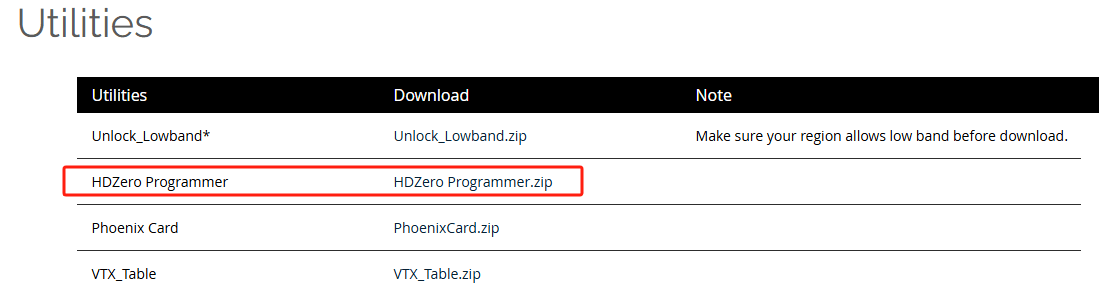
- Download HDZero Programmer application from https://www.hd-zero.com/document
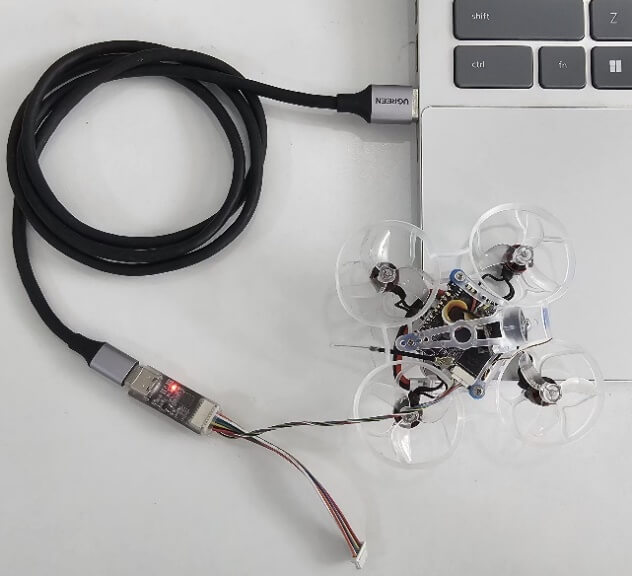
- Plug the HDZero VTX Programmer into AIO5's VTX FW Connector. And use the USBC cable to connect the programmer tool and PC
- Launch the HDZeroProgrammer.exe on a Windows PC
- Select the AIO5
- Click "Load Online Firmware" and select the version number
- Click "Flash VTX". "Connecting VTX ..." will be displayed at the bottom
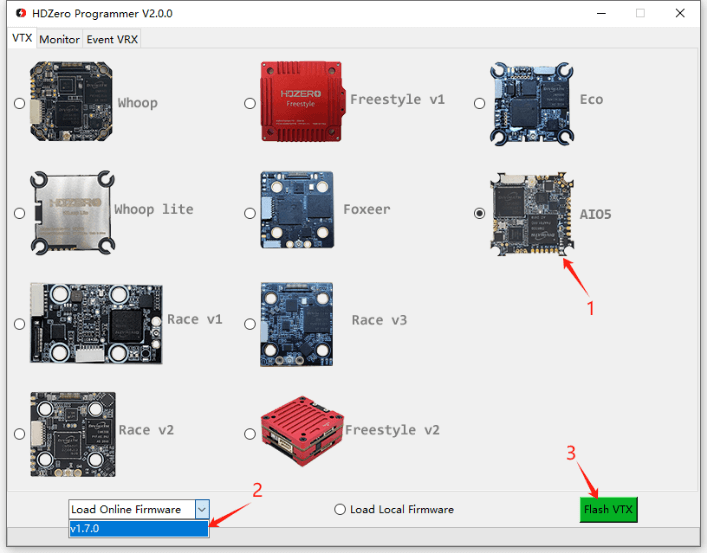
The application will automatically download the firmware and flash it.
 Ligen
Ligen Eason FPV